I picked up a TRMNL earlier this year and have enjoyed experimenting with it. It’s an e-ink display with a battery and microcontroller in a sleek case, complete with a wall-mount hook.
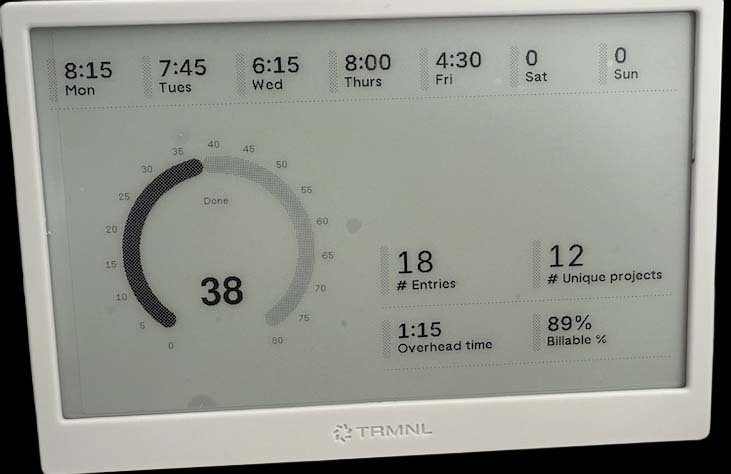
What drew me in was the flexibility: no power or network cables needed, strong developer docs, BYOD/BYOS support, and open-source firmware. Even if TRMNL disappeared tomorrow, the device would still be usable.
With a developer license, you can create custom plugins. I’ve built two so far:
- Apple Reminders sync using a Webhook
- Timesheet overview using Polling
Under the hood, the firmware connects to TRMNL’s backend, which manages the plugin playlist and generates images server-side. Plugins are split into data and view (markup) components.
Sharing Data with Plugins
Data can be passed to a plugin via strategies like Webhooks or Polling. For Webhooks, TRMNL provides a custom URL that accepts HTTP POST data, which is then rendered via HTML + Liquid templates.
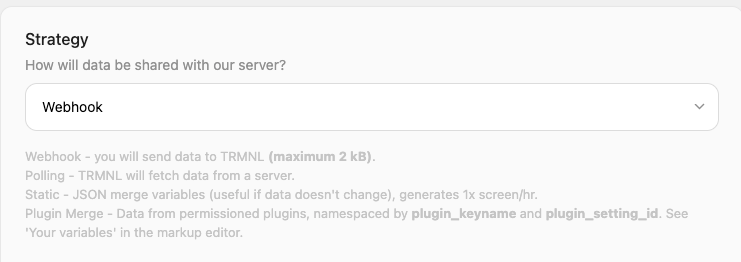
Once created, a plugin can be added to your playlist and scheduled to refresh at set intervals.
Apple Reminders Syncing
For syncing Apple Reminders (similar to Snazzy Labs’ setup), I use an Apple Shortcut to export my top 10 reminders, including tags and priority. The shortcut sends them via HTTP POST to my TRMNL Webhook.

In the TRMNL web interface, I created a plugin with:
- Webhook strategy
- 15-minute refresh rate
- Plugin config download
For the display, I used this markup with Liquid syntax (seen within the tbody tag) to loop through the reminders and render a table:
<div class="title_bar">
  <img class="image" src="/images/plugins/trmnl--render.svg" />
  <span class="title">My Reminders</span>
  <span class="instance">Apple Shortcuts</span>
</div>
<div class="layout layout-col gap--space-between">
  <div class="grid grid-cols-1">
    <div class="item">
      <div class="meta"></div>
      <div class="content">
        <table class="table table--condensed">
          <thead>
            <tr>
              <th><span class="title title--small">Title</span></th>
              <th><span class="title title--small">Tags</span></th>
              <th><span class="title title--small">Priority</span></th>
            </tr>
          </thead>
          <tbody>
            {% for Item in Items %}
            <tr>
              <td><span class="label">{{ Item.title }}</span></td>
              <td><span class="label">{{ Item.tags }}</span></td>
              <td><span class="label">{{ Item.priority }}</span></td>
            </tr>
            {% endfor %}
          </tbody>
        </table>
      </div>
    </div>
  </div>
</div>
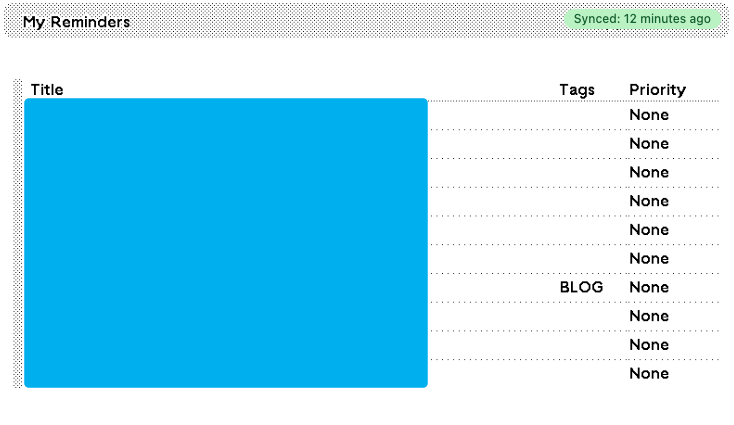
Which renders like this:

 blog.alancroll.com